InstaGas Policy Rules Overview
InstaGas provides customizable rules for gas policies. These rules are organized into four categories:
General Rules
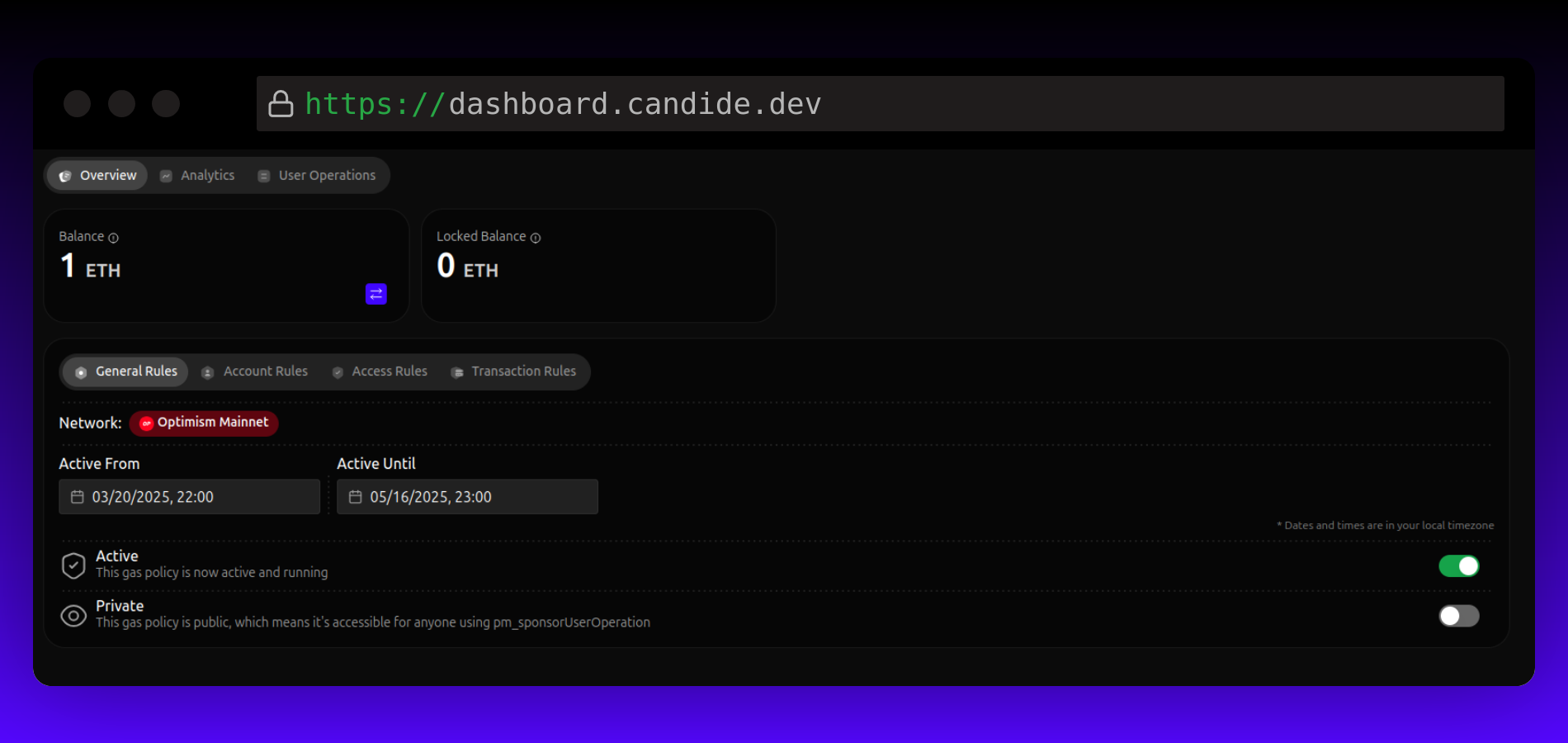
- Effective Date Range: Specify when the gas policy should be active. This setting is ignored if the policy is inactive.
- Active State: Toggle to activate or deactivate the policy at any time.
- Private or Public: Choose between public and private gas policies:
- Public Gas Policies: Set up by dApps for wallet consumption without requiring a sponsorship policy ID.
- Private Gas Policies: Set up by wallets, requiring a sponsorship policy ID. Used when no public gas policy matches.
Account Rules
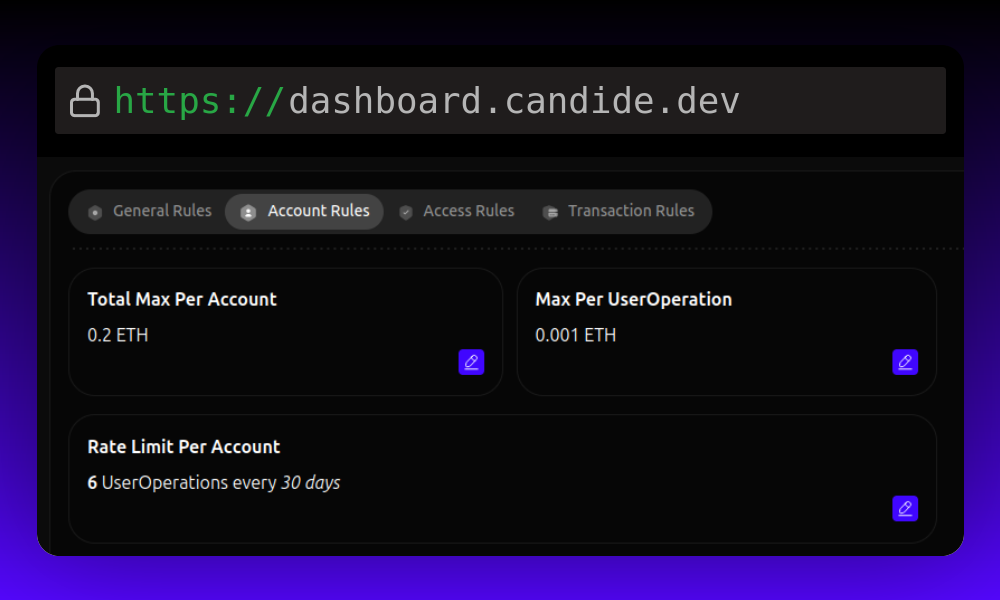
- Total Max per Account: Set an account spending limit.
- Example: "Each account has a total sponsorship gas limit of 0.5 ETH."
- Max per UserOperation: Limit transaction sponsorship.
- Example: "Each UserOperation can be sponsored up to 0.0001 ETH."
- Rate Limit Per Account: Define rate and period constraints.
- Example: "Each account is allowed x sponsorships per y days."
Access Rules
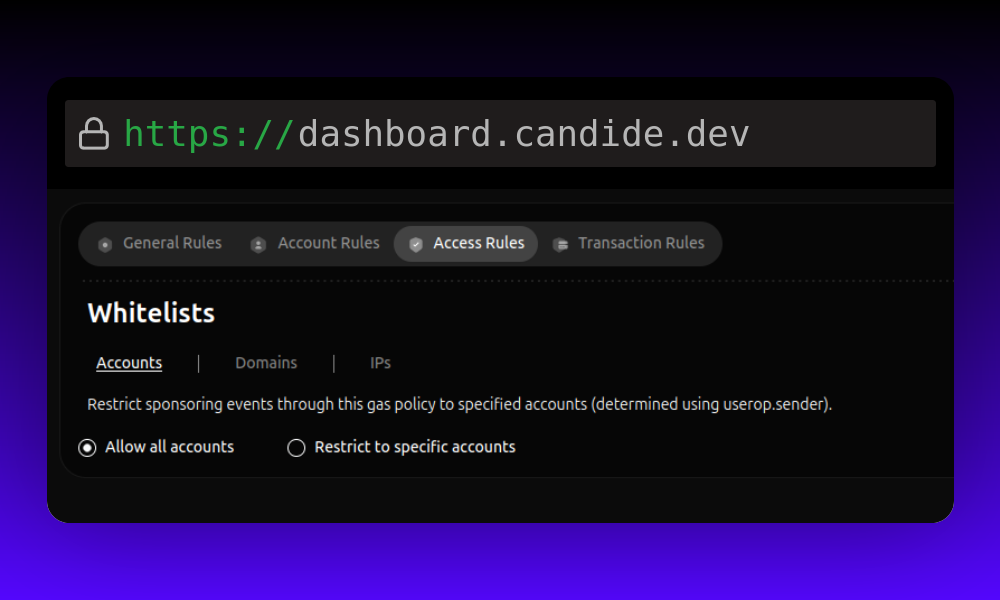
- Account Whitelist: Create an allowlist of accounts eligible for the gas policy. If empty, all accounts are allowed.
- Example: "Only sponsor transactions from sender
0xabcd...."
- Example: "Only sponsor transactions from sender
- Domains Whitelist: Create an allowlist of origins eligible for the gas policy. If empty, all origins are allowed.
- Example: "Only sponsor transactions originating from
https://app.uniswap.com." - Partial wildcards are supported for subdomains, but the protocol scheme is required.
https://*.candide.devis accepted;*.candide.devis not.
- Example: "Only sponsor transactions originating from
- IP Whitelists: Create an allowlist of IPs eligible for the gas policy. If empty, all IPs are allowed.
- Example: "Only sponsor transactions originating from IP
148.156.123.63."
- Example: "Only sponsor transactions originating from IP
Transaction Rules
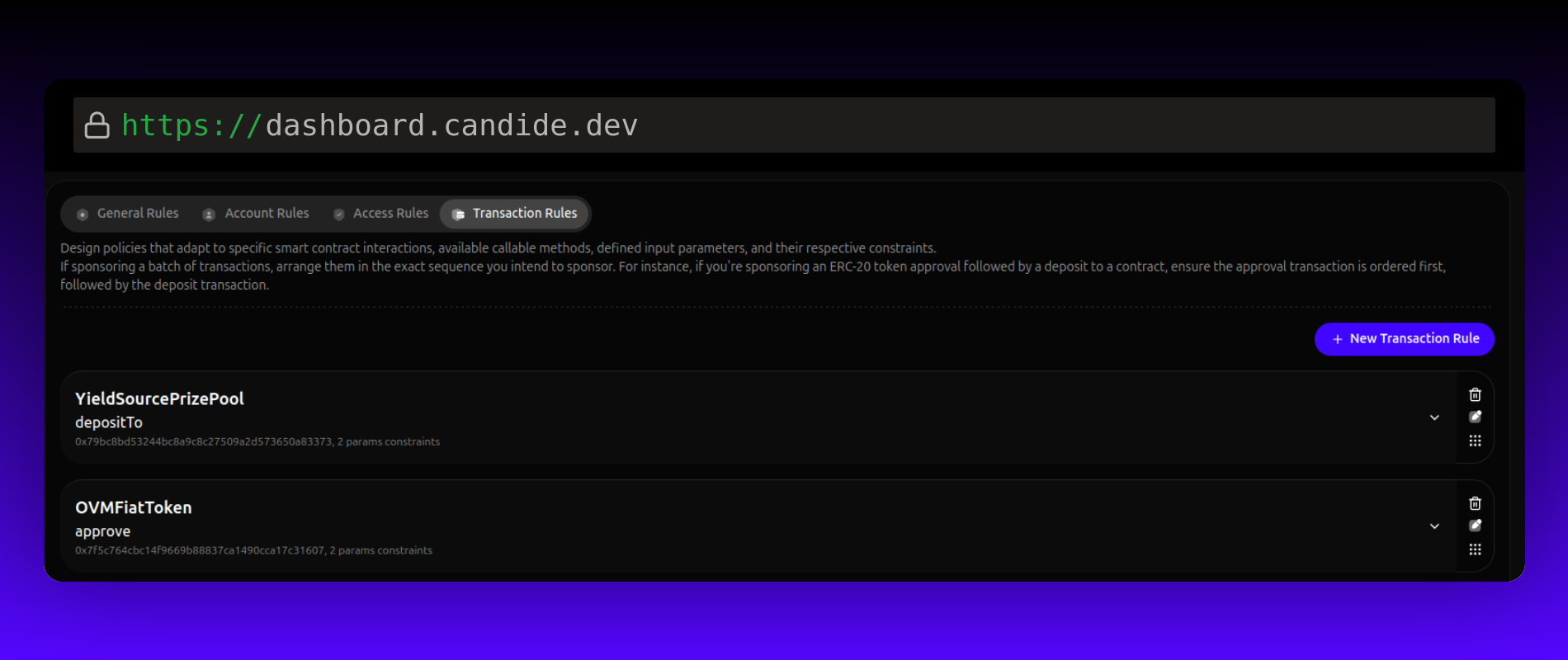
Transaction rules describe the exact calldata a policy sponsors. A policy holds one ordered list of rules, one rule per call, and a UserOperation is sponsored only when its calls match that list exactly: the same calls, in the same order, with nothing extra.
Rules are not a whitelist of methods. If a policy lists an ERC-20 approve followed by a deposit, a UserOperation must batch both calls in that order. A UserOperation that only sends the approve is not sponsored, and neither is one that adds a third call.
Each rule constrains one call:
- Contract Address: The smart contract the call must target.
- Example: "Call 1 must interact with smart contract
0x123."
- Example: "Call 1 must interact with smart contract
- Method: The function the call must invoke on that contract.
- Example: "Call 1 must invoke the
swapmethod."
- Example: "Call 1 must invoke the
- Parameters Constraints: Conditions on the decoded input parameters of that call.
- Example: "Call 1 is only sponsored when
tokenInamount is greater than or equal to 1 ETH."
- Example: "Call 1 is only sponsored when
To sponsor a single call, add one rule. To sponsor a batch, add one rule per call and order them the way the UserOperation executes them.
Example: Uniswap Swap Transaction
When you want to make a swap on Uniswap, you can make a call to the swap function with specific parameters. For instance:
swap(400, usdt, weth)
In this example:
swapis the function being called, which initiates the swap transaction.(400, usdt, weth)are the parameters being passed to theswapfunction, which specify the details of the swap:400is the amount of tokens to be swapped.usdtis the token being swapped (in this case, USDT).wethis the token being swapped for (in this case, WETH).
For each function, you can specify a list of parameters, and each parameter can have a constraint. For example, you can assign constraints to the parameters in the swap function as follows:
amount: greater than 350 (e.g.,amount > 350)tokenIn: equal to USDT (e.g.,tokenIn == usdt)tokenOut: equal to WETH (e.g.,tokenOut == weth)
By specifying these constraints, you can control the behavior of the swap transaction and ensure that it is executed according to your requirements. For instance, you can ensure that the swap transaction only occurs if the amount being swapped is greater than 350, and if the tokens being swapped are USDT and WETH.
Policy configuration example
Policies can be created and edited in the Dashboard or through the Platform API. The example below is a policy creation body using the public API field names.
For request validation, update semantics, and response fields, use the Gas Policy API reference as the canonical source.
{
  "name": "Onboarding sponsorship",
  "chainId": 10,
  "general": {
    "enabled": true,
    "private": false,
    "startDate": 1751500800000,
    "endDate": 1754179200000
  },
  "accountRules": {
    "totalMax": "0x6f05b59d3b20000",
    "maxPerOp": "0x5af3107a4000",
    "rate": 3,
    "ratePeriod": 86400
  },
  "accessRules": {
    "accounts": [
      { "value": "0xA1b2C3d4E5f6A7b8C9d0E1f2A3b4C5d6E7f8A9b0", "label": "Beta tester" }
    ],
    "origins": [
      { "value": "https://*.example.com", "label": "Our app" }
    ],
    "ips": []
  },
  "transactions": [
    {
      "to": "0xE592427A0AEce92De3Edee1F18E0157C05861564",
      "selector": "0x414bf389",
      "abi": "[{\"type\":\"function\",\"name\":\"exactInputSingle\",\"constant\":false,\"payable\":true,\"inputs\":[{\"type\":\"tuple\",\"name\":\"params\",\"components\":[{\"type\":\"address\",\"name\":\"tokenIn\"},{\"type\":\"address\",\"name\":\"tokenOut\"},{\"type\":\"uint24\",\"name\":\"fee\"},{\"type\":\"address\",\"name\":\"recipient\"},{\"type\":\"uint256\",\"name\":\"deadline\"},{\"type\":\"uint256\",\"name\":\"amountIn\"},{\"type\":\"uint256\",\"name\":\"amountOutMinimum\"},{\"type\":\"uint160\",\"name\":\"sqrtPriceLimitX96\"}]}],\"outputs\":[{\"type\":\"uint256\",\"name\":\"amountOut\"}]}]",
      "parameters": [
        { "index": "0;5", "operator": "$gte", "value": "0x0f4240" }
      ]
    }
  ]
}
General
| field | type | description |
|---|---|---|
enabled | boolean | Whether the policy is active. Disabled policies never sponsor, regardless of dates. |
private | boolean | Private policies require the wallet to pass the policy ID when requesting sponsorship. Public policies apply without one. |
sponsorshipPolicyId | string | Assigned by InstaGas at creation. Wallets reference it as the sponsorship policy ID for private policies. |
startDate | number | Unix timestamp in milliseconds. Sponsorship starts at this time. |
endDate | number | Unix timestamp in milliseconds. Sponsorship stops at this time. |
Account
| field | type | description |
|---|---|---|
totalMax | string (hex wei) | Lifetime sponsorship limit per account. 0x6f05b59d3b20000 is 0.5 ETH. |
maxPerOp | string (hex wei) | Maximum sponsored gas cost for a single UserOperation. 0x5af3107a4000 is 0.0001 ETH. |
rate | number | Number of sponsored UserOperations allowed per ratePeriod, per account. |
ratePeriod | number | Rate limit window in seconds. 86400 with rate: 3 means 3 sponsorships per account per day. |
Amounts are entered in ETH in the dashboard and stored as hex-encoded wei.
Access
| field | type | description |
|---|---|---|
accounts | {value, label}[] | Sender addresses eligible for sponsorship. Empty allows all senders. |
origins | {value, label}[] | Web origins eligible for sponsorship. Empty allows all origins. Subdomain wildcards are supported, and the scheme is required: https://*.example.com is valid, *.example.com is not. |
ips | {value, label}[] | IP addresses eligible for sponsorship. Empty allows all IPs. |
Transactions
The array is an ordered sequence. Entry n constrains the nth call of the UserOperation, and the UserOperation is sponsored only when it contains exactly this many calls, each matching its entry. Constraints within an entry must all pass for the call to qualify.
| field | type | description |
|---|---|---|
to | string (address) | The contract the call must target. |
selector | string (4-byte hex) | The function selector the call must invoke. |
abi | string | A JSON-stringified ABI array containing the complete function fragment, used to decode call parameters for constraint checks. |
parameters | constraint[] | Constraints on the decoded call parameters. Empty sponsors any call to this function. |
Each parameter constraint:
| field | type | description |
|---|---|---|
index | string | Argument index. Use semicolons for nested tuples: 0;5 targets the sixth field of the first argument. |
operator | string | One of the operators below. |
value | string | The value the decoded argument is compared against. Encode uint and bytes values as 0x-prefixed hexadecimal strings. Token amounts are in the token's smallest unit. |
Supported operators:
| operator | meaning |
|---|---|
$eq | Equals |
$gt | Greater than |
$gte | Greater than or equal |
$lt | Less than |
$lte | Less than or equal |
$startsWith | Value prefix match |
The comparison operators apply to numeric parameters. Use $eq for addresses and exact matches.